

Settings
Every Settings field with its default and values, and the settings file behind them
Open Settings from the sidebar, then pick a section from the list on the left to change a field. Every value saves as soon as you finish with it, and a Reset button appears next to a label whose value you changed from its default.
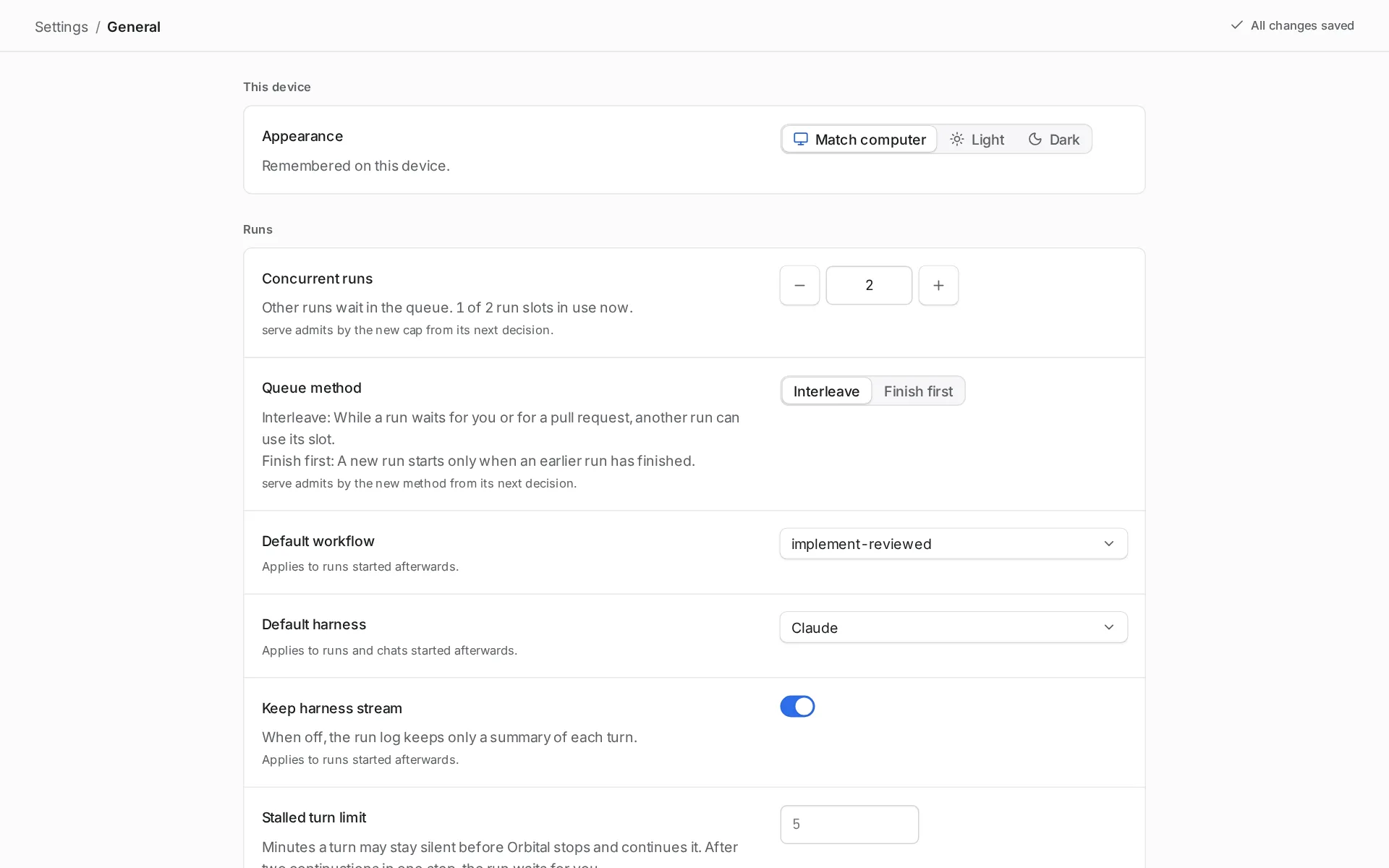
A text field saves when you press Enter or leave the field. Escape puts the field back to its saved value. A line under a field says when the change applies, for example “Applies to runs started afterwards.”
Settings has no Accounts section. Appearance is in Settings > General.
General
Section titled “General”Settings > General holds the appearance on this device and the settings for runs, worktrees and the server. It has four groups: This device, Runs, Worktrees and Serve.
| Field | What it does | Default and values |
|---|---|---|
| Appearance | Whether Orbital looks light or dark. It applies at once and is remembered on this device. | Match computer, which follows your computer’s light or dark setting. Or Light or Dark. |
| Concurrent runs | The most runs that work at the same time. Other runs wait in the queue. The line under it shows how many run slots are in use now. A project can have a lower limit of its own on its page; see the queue. | 2. A whole number from 1 to 16. Use the minus and plus buttons or type a number. |
| Default workflow | The workflow a run uses when you do not choose one. Applies to runs started afterwards. | pursue-goal. Any workflow Orbital can load without a project. |
| Default harness | The harness a run or chat uses when nothing names one. While a preset that names a harness is in use, the row says “Comes from the preset in use” and links to Presets. Otherwise you choose it here. Applies to runs and chats started afterwards. Only harnesses that are turned on are listed. A harness that cannot start is marked, for example “(not installed)”. | Claude. Claude, Codex or OpenCode. |
| Stalled turn limit | Minutes a turn may stay silent before Orbital stops it and starts it again in the same session. After two such restarts in one step, the run is Paused, with the badge “Waiting on you”. Applies to runs started afterwards. | 5. A whole number from 1 to 240. Leave it empty for the default. |
| Open worktrees in | The application that opens a run’s worktree. Opening a folder in another application also changes this. | “Let Orbital choose”. Or one of the applications Orbital finds on this computer. |
| Port | The port the server listens on. 0 picks a free port. Takes effect the next time the server starts. If the server was started with --port, that flag overrides this. |
42121. A whole number from 0 to 65535. Leave it empty for the default. |
| Public address | Where people reach Orbital, such as http://ryzen-dev.home.f0wl.org:3333. Links Orbital hands out are built from it: the run link start_run returns over MCP and the link orbital run start prints. Applies at once. It does not change which requests the server admits: a server bound to loopback still answers only to loopback names, so to serve it at the public address’s name, bind it wider (--bind 0.0.0.0). Account sign-in keeps returning to the loopback address. |
Empty: links use the address the server listens on. An http or https URL with no path, query or fragment; a trailing slash is dropped. |
Harnesses
Section titled “Harnesses”A harness is the coding agent program that runs a step, such as Claude Code or Codex. This section shows whether each harness can start, and sets how Orbital starts it.
Status
Section titled “Status”The Status table in Settings > Harnesses shows what Orbital last found for each harness. Select Check again to check now.
| Field | What it does | Default and values |
|---|---|---|
| Harness | The harness the row is about. | Claude, Codex, OpenCode. |
| Installed | Whether Orbital can start the harness. | “Not checked yet”, “Off”, “Not installed”, “Could not start”, “Stopped by the system”, “Too old” with its version, “Installed”, or “Installed” with its version. |
| Signed in | Whether the harness is signed in to its account. Shown only for an installed harness. | “Signed in”, “Signed out” or “Sign-in not reported”. |
| Checked | The time of the last check. | A time of day. |
When a harness has a problem, a note under the table says what is wrong and how to fix it.
Claude, Codex and OpenCode
Section titled “Claude, Codex and OpenCode”Each harness has its own group with the same fields.
| Field | What it does | Default and values |
|---|---|---|
| Turned on | When off, runs that need this harness stop and are Paused, with the badge “Waiting on you”, and its chats take no new turns. You cannot turn off the default harness. Choose another default first. | On. |
| Program | The program Orbital starts for this harness, in place of the one it finds itself. Applies to runs and chats started afterwards. | Empty. Claude uses “claude on PATH”. Codex uses “codex on PATH”. OpenCode uses “opencode on PATH”. |
| Default model | The model this harness uses when a step does not name one. Applies to runs and chats started afterwards. | “The harness’s own default”. Or a model Orbital knows for this harness. |
| Default effort | The reasoning effort this harness uses when a step does not name one. Applies to runs and chats started afterwards. | “The harness’s own default”. Claude: low, medium, high, xhigh, max. Codex: minimal, low, medium, high, xhigh, max, ultra. OpenCode takes no reasoning effort, so the field is off. |
| Accounts, in order of priority | Claude only. The Claude accounts turns run on, each a Claude Code config folder with a login of its own. Type a name and a folder, then select Add an account. The first account is Primary and the others are Fallback 1, Fallback 2 and so on; the arrows move an account up or down. Each account shows whether it is signed in, with the command to sign it in when it is not, and until when it is out of quota. A new session starts on the first account with quota left and stays on it; when that account runs out, the step carries on in a new session on the next one. Remove deletes an account. Applies to runs and chats started afterwards. | None, which means Claude uses whichever login it finds. Leave the folder empty for ~/.claude. Name each account once and give each its own folder. |
| Environment variables | Variables Orbital sets when it starts this harness. Select Add a variable, then type a name and a value. Values are hidden once saved. Remove deletes a variable, and Undo brings it back. Applies to runs and chats started afterwards. | None. A name starts with a letter or an underscore and holds only letters, digits and underscores. |
When a harness runs out of quota
Section titled “When a harness runs out of quota”This group names the preset a run moves to when its own harness runs out of quota. The delivery lead, when it is on, pins the run to this preset and retries the step. Without the delivery lead, the run is Paused, with the badge “Waiting on you”. Switch a run’s harness describes what the switch does.
| Field | What it does | Default and values |
|---|---|---|
| Move to preset | The preset to move the run to. Each role then runs on the preset’s harness, model and effort. | “None”. Or any of your presets. |
Settings shows the first fallback only. The settings file can hold a list of fallbacks, tried first to last. See quotaFallbacks in the settings file.
Delivery lead
Section titled “Delivery lead”The delivery lead is a chat that looks after your runs. This section appears only while the delivery lead experimental feature is on. Read its settings for the full description of every field.
Settings for at the top chooses which delivery lead you change: Orbital-wide, or a project’s own delivery lead. A project’s delivery lead follows the Orbital-wide settings until you change a field.
| Field | What it does | Default and values |
|---|---|---|
| Status | The Delivery lead switch turns it on or off. Pause for today stops it acting until the next 07:00. Resume now ends a pause. | See the delivery lead page. |
| Watched projects | Watches: the runs it looks after. Only the Orbital-wide delivery lead has this group. | “All projects”, or only the projects you pick. |
| What it may do | One choice for each action it can take. | “Do it”, “Ask me first” or “Never”. |
| What it may read | A switch for each connected source. | On or off. |
| What wakes it | A switch for each reason, and Look over runs at work. | “Every hour”, “Every few hours” or “Off”. |
| Who it is | The delivery_lead persona sets its prompt, and the preset in use sets its harness, model and effort. Edit them in Personas and Presets. |
The shipped delivery_lead persona. |
| Quota fallbacks | The presets to move a run to when its harness runs out of quota, tried first to last. | A list you order. |
| Spending | Daily limit and Runs it started, at work at once. | “No limit”, “Tokens a day” or “Estimated cost a day, in USD”. “No cap” or “At most” a number of runs. |
| Notifications | Tell me about, Quiet hours and Desktop notifications. | “Decisions only”, “Decisions and failures” or “Every action”. |
| Reports | When it acts, say and Daily summary. | “Brief” or “Detailed”. “Off” or “Every day at” a time. |
| Notes | Its notes: what it keeps in mind between conversations. | Written by the delivery lead. You can change them. |
| Your instructions | For all projects, and one field for each project. | Empty. |
| Housekeeping | Archive finished runs and Keep its activity log. | “Never” or “After” a number of days. |
| Start over | Resets every field to its default, or to the Orbital-wide settings for a project’s delivery lead. | A button. |
Presets
Section titled “Presets”Settings > Presets holds presets. A preset is a style saved in Orbital: a named set of turn settings that every workflow can name without defining it. A step names a preset with style, exactly as it names a style its workflow defines, and presets cascade from the workflow to its groups and steps the same way. A preset wins over a style of the same name in a workflow or style file, on every key it sets. To change a shipped preset for one workflow only, extend it under a new name in that workflow.
One preset is in use across Orbital. A run started without a preset follows it, and switching the preset in use moves those runs at their next turn. A run started with a preset, from the Start page’s preset picker or start_run(preset), is pinned to it and stays. The run’s preset comes after everything the workflow sets: a step’s own keys, its styles, its groups’ styles and the workflow’s style still win, and the defaults in Harnesses come last.
| Field | What it does | Default and values |
|---|---|---|
| Preset switch | One segment per preset. Each shows the harness it names, if any, and “N runs at work” for the preset in use, “ready”, or “out of quota”. Selecting a segment puts that preset in use. | claude is in use on a fresh install. |
| Preset list | Every preset with the settings it holds. A badge marks a preset Orbital ships, and another a shipped preset you changed. Selecting a preset opens it to edit. | The shipped presets below, and your own. |
| New preset | Creates a preset from a name, an optional preset to extend, and the keys you set. | A button. |
When the harness of the preset in use runs out of quota, a banner says how many runs are waiting. It offers one switch for each preset whose harness can run. Switching from the banner puts that preset in use and resumes the waiting runs, which continue on it at their next turn. Orbital never switches the preset in use by itself.
Edit a preset
Section titled “Edit a preset”Selecting a preset opens it with these fields.
| Field | What it does | Default and values |
|---|---|---|
| Name | The name workflows use for the preset. | Required. Lowercase snake_case, such as careful_review. |
| Extends | One preset or style this one starts from. It keeps that preset’s keys and replaces the ones it sets. | None. Any other preset. |
| Harness | The harness that runs the turn. | None, so the harness of the run’s preset. Claude, Codex or OpenCode. |
| Model | The model the harness uses. | None, so the harness’s default model. |
| Effort | How hard the model thinks. | None, so the harness’s default effort. Each harness takes only some of minimal, low, medium, high, xhigh, max and ultra. |
| Connection | The connection the harness routes the turn through. | None. |
| Provider | The model provider. OpenCode only. | None. |
| Persona | Who the agent is, from Personas. | None. |
| Permissions | Whether the harness asks before the agent acts. See permissions. | None, so auto-accept. auto-accept or full. |
| Claude, Codex and OpenCode | Settings that apply only when that harness runs the step, and beat the plain ones there: the harness sub-tables claude.*, codex.* and opencode.*. |
None. Harness-specific keys lists them. |
| Reset to default | Puts an edited shipped preset back to Orbital’s version. | A button on shipped presets you changed. |
| Delete | Asks first, then deletes the preset. A shipped preset is hidden, and Deleted defaults lists it with Restore. | A button. |
Orbital adds its shipped presets each time it starts. It never overwrites a preset you edited, your own presets, or a shipped preset you deleted.
| Preset | Settings |
|---|---|
balanced |
effort = "medium" |
deep_thinking |
effort = "high" |
planner |
persona = "planner", effort = "high" |
implementer |
persona = "implementer", effort = "medium" |
reviewer |
persona = "strict_reviewer", effort = "high" |
researcher |
persona = "researcher", effort = "medium" |
claude |
harness = "claude". In use on a fresh install. |
codex |
harness = "codex" |
Personas
Section titled “Personas”Settings > Personas holds the personas. A persona is a named prompt that the agent receives with the step’s own prompt. A style or an agent step names one with persona.
| Field | What it does | Default and values |
|---|---|---|
| Name | The name styles and steps use for the persona. | Required. Lowercase snake_case, such as strict_reviewer. |
| Prompt | What the agent is told about who it is. | Required. |
Orbital ships the personas planner, implementer, strict_reviewer, researcher and delivery_lead. The delivery lead speaks as delivery_lead.
Decision models
Section titled “Decision models”This section sets up the decision models that decide steps and deciding fan-outs ask. With none, every decision takes its default path. It has two groups: Models and, while you add or edit one, Add a model or Edit with its name.
| Field | What it does | Default and values |
|---|---|---|
| Start from | The preset that fills in the plugin, address and model: Jev, Jev via OpenRouter, Clef, Clef-flash, Laya, Kev or Custom System One. Shown only when you add a model. | The first preset. |
| Name | What a step’s decider calls the model. Fixed once the model is added. |
Lowercase letters, digits and hyphens. |
| Model | The model id the provider is asked for. | Set by the preset. |
| Base URL | Where the provider is reached. Clef asks for Cloudflare account id instead. | Set by the preset, or blank. |
| Threshold | The confidence a step needs from the model when it sets no threshold. |
0.5. A number from 0 to 1. |
| API key | Kept encrypted in the secret store, and never shown again. Leave it blank when you edit to keep the saved key. | None. |
| Test | Asks the model a sample question and shows its answer and confidence, or why it failed. | A button on each model. |
| Make default | Makes the model the one steps use when they name no decider. The first model you add is the default. |
A button on each model that is not. |
| Remove | Asks first, then removes the model and its key. Steps that name it take their default path. | A button on each model. |
GitHub
Section titled “GitHub”This section saves the GitHub token Orbital uses for its GitHub requests. It has two groups: Token and Where serve takes its token from.
| Field | What it does | Default and values |
|---|---|---|
| Saved token | Paste a token to save it. The line under it names the GitHub account and shows the token masked. Remove saved token asks first, then removes it. The server then uses the next source in the list. | “No token is saved in Orbital.” |
| Token sources | The places Orbital looks for a token, in order. The first source with a token is used. Each shows “In use”, “Found, not used” or “Not set”. | 1. Saved token. 2. GH_TOKEN. 3. GITHUB_TOKEN. 4. gh auth login. |
Linear
Section titled “Linear”This section saves the Linear key that Linear trigger rules use to check Linear.
| Field | What it does | Default and values |
|---|---|---|
| Personal API key | Paste a personal API key from Linear. Once it works, the line under it names the Linear user and shows the key masked. Remove saved key asks first, then removes it. Linear rules stop checking Linear until you save a key again. | “No key is saved. Linear rules cannot check Linear until one is.” |
Orbital runs an MCP endpoint so coding agents outside Orbital can read and control your runs. Read connect an MCP client for the steps, and MCP tools for the tools.
| Field | What it does | Default and values |
|---|---|---|
| Turned on | Turns the endpoint on or off. | On. |
| Status | Whether the endpoint accepts connections. | “Listening”, “Checking endpoint”, “Not reachable on its port”, “Status unavailable” or “Off”. |
| Endpoint address | The address clients connect to. Copy copies it. If the usual port was taken when Orbital started, a note says to update registered clients. | Set by the server’s port. |
| Token | The token clients send. Reveal shows it and Hide hides it. Copy copies it. Regenerate makes a new token and disconnects every registered client until you register it again. | Made by Orbital. |
| Register a client | One row for each client: Claude Code, Codex, OpenCode and Generic MCP client. Copy setup copies the command or values to paste. Start a new session of the client to use it. | The token is hidden in the preview until you select Reveal. |
The Tool groups group turns groups of MCP tools on or off.
| Field | What it does | Default and values |
|---|---|---|
| Reading runs and workflows | Lets clients read runs and workflows. | On. |
| Starting runs | Lets clients start runs. | On. |
| Controlling runs | Lets clients control runs. | On. |
| Messaging and answering runs | Lets clients message and answer runs. | On. |
| Archiving | Lets clients archive runs. | Off. |
| Changing Orbital’s settings | Lets clients, and a delivery lead, change settings with change_setting. Each change shows in Settings > Recent changes. |
Off. |
| One-off workflows from agents outside Orbital | What happens when a client proposes a One-off Workflow with start_run. Ask me first holds the run until you approve it. Do it starts it at once, under the same one-off rules. Never refuses it. It shows only while One-off workflows is turned on in Settings > Experimental, and needs Starting runs on. |
Ask me first. |
Costs sets the prices Orbital uses to estimate what runs cost. Prices are in USD per million tokens. Yours replaces Orbital’s reference price for that exact model name.
| Field | What it does | Default and values |
|---|---|---|
| Model prices | One row for each model you price: the model name, an Input price and an Output price. Add a model price adds a row. Remove deletes a row, and Undo brings it back. | “No prices of your own. Orbital uses its reference prices.” A price is zero or more. |
Command line and skills
Section titled “Command line and skills”This section installs the orbital command and Orbital’s agent skills, so you and your coding agents can use Orbital from a terminal. Read skills to learn what the skills do.
| Field | What it does | Default and values |
|---|---|---|
| orbital command | Lets you, and coding agents such as Claude Code, start and check Orbital runs from a terminal. Only the desktop app can install it. It links /usr/local/bin/orbital to the app. Your Mac may ask for an administrator password. After installing, open a new terminal window and run orbital --help. |
“Not installed.”, “Installed. It runs this app.”, “Installed, but it runs a different copy of Orbital. Reinstall it to use this app.”, or “Installed. Orbital is running from it.” The button reads Install or Reinstall. |
| orbital-create-workflow | A skill that teaches coding agents to design Orbital workflows. | See the skill states below. |
| orbital-delivery-lead | A skill that teaches coding agents to deliver tickets through Orbital runs. | See the skill states below. |
Orbital installs a skill for every project on this computer. Each skill row shows one of these states and offers one action.
| State | Action |
|---|---|
| “Not installed.” | Install. |
| “An update is available.” | Update. |
| “A different copy with this name is installed. Orbital will keep it unless you replace it.” | Replace…. Orbital asks first, then moves the other copy to a backup folder. Keep it leaves it. |
| “Installed.” | None. |
Experimental features
Section titled “Experimental features”These features are still being tried out. They may change or be removed. Each one is off until you turn it on.
| Field | What it does | Default and values |
|---|---|---|
| Delivery lead | “A standing chat that watches your runs and steps in when one needs help.” When on, a delivery lead chat is pinned in your chat list, the Delivery lead section appears in Settings, a project’s page can add its own delivery lead, and the delivery lead’s notifications show. Read the delivery lead. | Off. |
| One-off workflows | “Agents can propose a workflow written for one piece of work. It waits for you to approve it before it runs.” When on, start_run takes a One-off Workflow’s text and holds the run for approval. Read start_run. |
Off. |
| Pause and chat | Makes runtime Run interaction modes selectable. Choose the persisted Default Run interaction here. Runs can inherit it or choose an override in Run actions > Run interaction. Existing paused conversations keep their rules when disabled. | Off; default mode Steer. |
| Triggers | “Rules that start, pause, stop or message runs when GitHub, Linear or a schedule says so.” When on, Triggers appears in the sidebar, and each project’s page has a Triggers section for its rules. Read triggers. | Off. |
Recent changes
Section titled “Recent changes”Settings > Recent changes lists the newest changes to your settings, newest first. Each line says which setting changed, its old and new value, who or what made the change, and when, to the second. A change to a secret, such as the GitHub token, the Linear key or a harness variable, shows only that it was set, removed or changed, never its value.
A change comes from one of these places:
| Source | What made the change |
|---|---|
| Settings page | A setting changed in the app, the delivery lead’s settings and their reset included. A change to a delivery lead’s settings is listed under the delivery lead’s name, such as “Delivery lead: Paused”. |
| Opening a worktree | Opening a run’s folder in an application, which Orbital remembers as Open worktrees in. |
An agent, with the change_setting tool |
An MCP client or a delivery lead. See change_setting. |
| Command line | orbital settings set, with the words it was given. |
| A request that did not say who sent it | A script that called PATCH /api/settings, or PATCH or DELETE /api/delivery-leads/:deliveryLead/settings, directly. |
| An edit to config.json | A hand edit of the settings file. Orbital notices it the next time it reads the file, such as when it starts. |
Orbital keeps this record with its run history in ~/.orbital/run-history.db, so it stays after a restart. If Orbital stops while it saves a change, the change is still listed with who made it once Orbital starts again.
Settings > About shows the version that is running and where your settings are kept. Its group is called This serve.
| Field | What it does | Default and values |
|---|---|---|
| Version | The Orbital version the server runs. | “Orbital” followed by the version number. |
| Updates | Whether a newer version of Orbital is out, and the command to upgrade. | It names the newer version, says you have the newest one, says it has not checked yet, or says this server does not check. |
| Settings file | The full path of the settings file. You can edit this file by hand. Changing a setting in the app rewrites only that setting’s line. | ~/.orbital/config.json. |
Licenses
Section titled “Licenses”Settings > About links to Licenses, a page that lists the open source packages Orbital ships in its web app, its server and its desktop app, with the license each is used under. The header counts the notices, and the search field filters them by package name or license.
Each row shows a package’s name, version and license, and which parts of Orbital use it: Web, Server or Desktop. Open a row to see a link to its source and its full license text. A package that ships no license file shows the license it declares and says that no license text was found.
The settings file
Section titled “The settings file”Orbital keeps its settings in ~/.orbital/config.json. The file holds the keys in the table below. The MCP token, the styles, the personas and the delivery lead settings are kept elsewhere.
You can edit the file by hand. Orbital reads it again each time it needs a value, so most edits apply without a restart. Settings > Recent changes lists each hand edit as “An edit to config.json”. The port applies the next time the server starts. Orbital keeps keys it does not know. A key you leave out uses its default.
If the file is not valid JSON, or holds a value Orbital cannot read, Orbital uses its defaults and writes a warning to its log. Settings cannot save changes until you fix the file.
To keep Orbital’s data somewhere else, set the ORBITAL_HOME environment variable to a folder before you start Orbital. Orbital then uses the .orbital folder inside that folder, including its config.json.
The GitHub token, the Linear key and the OpenRouter key are not in this file. Orbital keeps them encrypted in its secret store, which lives with its run history in ~/.orbital/run-history.db. The key that encrypts them comes from ORBITAL_SECRET_KEY when you set it, otherwise from the OS secret store, otherwise from a key file, ~/.orbital/master-key, that Orbital creates once for your user only. Back that file up with run-history.db.
| Key | What it holds | Default and values |
|---|---|---|
maxConcurrentRuns |
Concurrent runs. | 2. A whole number of 1 or more. Settings offers 1 to 16. |
interactionMode |
Default for the next Run interaction. | "Steer" or "PauseAndChat"; "Steer" when absent. |
defaultWorkflow |
Default workflow. | "pursue-goal". |
harness |
Default harness. | "claude". "claude", "codex" or "opencode". |
turnStallMinutes |
Stalled turn limit. | 5. A whole number from 1 to 240. |
idleCompactionMinutes |
Idle session compaction window: Orbital compacts a resumable session once it has sat idle this long after its last turn, before the harness’s prompt cache expires. Harnesses that cannot compact are skipped. | 55. A whole number from 0 to 1440; 0 turns it off. |
opener |
Open worktrees in. | Left out, so Orbital chooses. |
port |
Port. | 42121. A whole number from 0 to 65535. |
publicAddress |
Public address. | Not set. An http or https URL with no path. |
modelPrices |
Model prices, keyed by model name. Each holds inputPerMillion and outputPerMillion in USD. |
{}. |
harnesses |
One object for each of claude, codex and opencode, with the keys below. |
{}. |
harnesses.<name>.enabled |
Turned on. | true. true or false. |
harnesses.<name>.executable |
Program. | Left out, so Orbital finds the program. |
harnesses.<name>.model |
Default model. | Left out, so the harness uses its own default. |
harnesses.<name>.effort |
Default effort. | Left out, so the harness uses its own default. |
harnesses.claude.accounts |
Claude accounts in order of priority, the first being the primary one. Each holds a name and an optional folder, the Claude Code config folder Orbital passes as CLAUDE_CONFIG_DIR. An account without a folder uses Claude’s own default. |
[]. |
harnesses.<name>.environment |
Environment variables, as name and value pairs. The file holds the values as plain text. | {}. |
mcp.enabled |
MCP endpoint turned on. | true. |
mcp.groups |
MCP tool groups: reading, starting, controlling, messaging, archiving, triggers and settings (Changing Orbital’s settings), each true or false. |
true for reading, starting, controlling and messaging. false for archiving, triggers and settings. |
mcp.oneOff |
One-off workflows from agents outside Orbital: AskFirst, DoIt or Never. |
AskFirst. |
features |
Experimental features: DeliveryLead, Triggers and PauseAndChat, each true or false. |
All false. |
quotaFallbacks |
A list of fallbacks, tried first to last. Each holds a preset, the name of a preset. Name each fallback once. A fallback an earlier version saved as a harness is converted when Orbital starts to the first preset on that harness, or dropped when there is none; Settings records the conversion. |
[]. |
This example sets three runs at once, turns Codex off and adds a fallback.
{ "maxConcurrentRuns": 3, "harnesses": { "codex": { "enabled": false } }, "quotaFallbacks": [{ "preset": "Codex" }]}Related
Section titled “Related”- Settings: what each Settings section is for and when to change it
- The orbital command: change settings from a terminal with
orbital settings set - MCP tools: the tools each MCP tool group turns on
- Models and prices: the reference prices that Settings > Costs replaces