

Delivery lead
A standing chat that watches your runs and steps in when one needs help
You turn on the delivery lead to have a chat that looks after your runs while you are away. It leads delivery inside Orbital: when a run needs help, it steps in, it asks you about what it cannot decide, and it tells you what happened. A watcher wakes it, and it acts within the limits you set.
This page describes the built-in delivery lead. To run a delivery lead from a coding agent instead, or to learn the loop a delivery lead follows, see Lead delivery.
Orbital attaches its own MCP server to chats as orbital_app. On Claude, load its tools with ToolSearch, for example select:mcp__orbital_app__list_runs. This server is separate from an orbital server you register in your own agent configuration.
Turn it on
Section titled “Turn it on”-
Open the experimental features.
Open Settings > Experimental features.
-
Turn on the delivery lead.
Turn on the Delivery lead switch. It reads “A standing chat that watches your runs and steps in when one needs help.”
-
Open its chat.
A chat named Delivery lead now appears, pinned at the top of your chat list. It is never archived.
While the feature is off, no part of the delivery lead runs or shows.
What it watches
Section titled “What it watches”Orbital keeps a record of every run. A built-in watcher reads that record, and the watcher spends no model tokens. It wakes the delivery lead only for these reasons:
| Reason | What counts |
|---|---|
| Needs a decision | A run stops by itself and is Paused, with the badge “Waiting on you”. A run at a gate, such as one waiting for a pull request review, does not count, because that is your process working. |
| Failed | A run ends Failed. |
| Out of quota | A harness runs out of quota. |
The watcher also wakes the delivery lead to look over runs that are still going, every hour unless you change it. It also wakes the delivery lead when you approve or decline something it asked about, and for a daily summary if you turn that on.
The watcher looks at the record every 15 seconds. The same reason wakes the delivery lead only once. If the app was closed, the watcher catches up when you open it again. A restart neither repeats a wake-up nor loses one.
Orbital retries a turn that stalls by itself, twice in one step, and wakes the delivery lead only when that does not help. A run stops, and the watcher wakes the delivery lead, in three cases: Orbital gives up on a stalled turn, a step reaches its visit limit, or the working folder cannot be used.
Your runs already handle some problems themselves, so the delivery lead leaves them alone: failing checks, merge conflicts and review changes that the delivery workflow repairs, and closing tickets. A run that waits days for a person to review its pull request is normal. The delivery lead does not chase it.
What it will and will not do
Section titled “What it will and will not do”The delivery lead acts inside Orbital. In your tracker and pull requests, it writes only when you ask it to or approve it.
| It can | It does not |
|---|---|
| Send a running step a message, or answer its question | Comment on, review, approve or merge pull requests without your go-ahead |
| Pause, resume, retry, jump, skip a wait, restart or abort a run | Turn on auto-merge |
| Revise a run’s goal | Ping reviewers |
| Move a run to another harness | Post in Slack or anywhere else |
| Commit a run’s uncommitted work on the run’s own branch and push it, never with force and never to main | Create, edit, comment on or close tickets without your go-ahead |
| Start runs | |
| Archive runs | |
| Check what a run delivered |
It follows these safety rules:
- It secures a run’s work before it aborts the run, and aborts only a run that holds no unpushed work.
- It never deletes a branch that holds work nobody has pushed.
- It does what you asked and no more.
Each action appears in the run’s thread as coming from the delivery lead, with its reason. A short line also appears in the delivery lead chat, for example “Delivery lead paused run …”. To have an action undone, ask in the chat.
When something in your tracker or pull requests needs saying, the delivery lead drafts the text in its chat and offers to post it. Tell it to post, and it posts the text itself through the tools its harness offers.
The delivery lead can read connected sources, such as your tracker or GitHub, to answer a real question. It writes through them only when you ask it to or approve it.
How its calls are scoped
Section titled “How its calls are scoped”The delivery lead gets every tool its harness offers, the same as a coding agent: it can read and change files, run commands, use the web, and call MCP servers and connectors, apart from the MCP servers you block in its settings. It acts on runs through Orbital’s own MCP tools, and Orbital checks every call it makes to them against these rules:
- It must give a reason with every action. The reason is recorded on the run and in its chat.
- It acts only on runs it owns.
- Each action follows What it may do: Do it, Ask me first or Never.
- It stops acting when it is off, paused for today, or over its daily limit.
MCP tools lists every rule.
Talk to it
Section titled “Talk to it”Open the pinned delivery lead chat and write to it as you would to a person who leads delivery. For example:
- “Start the triggers epic.”
- “Why is this run stuck?”
- “What landed today?”
You can attach files, as in any chat.
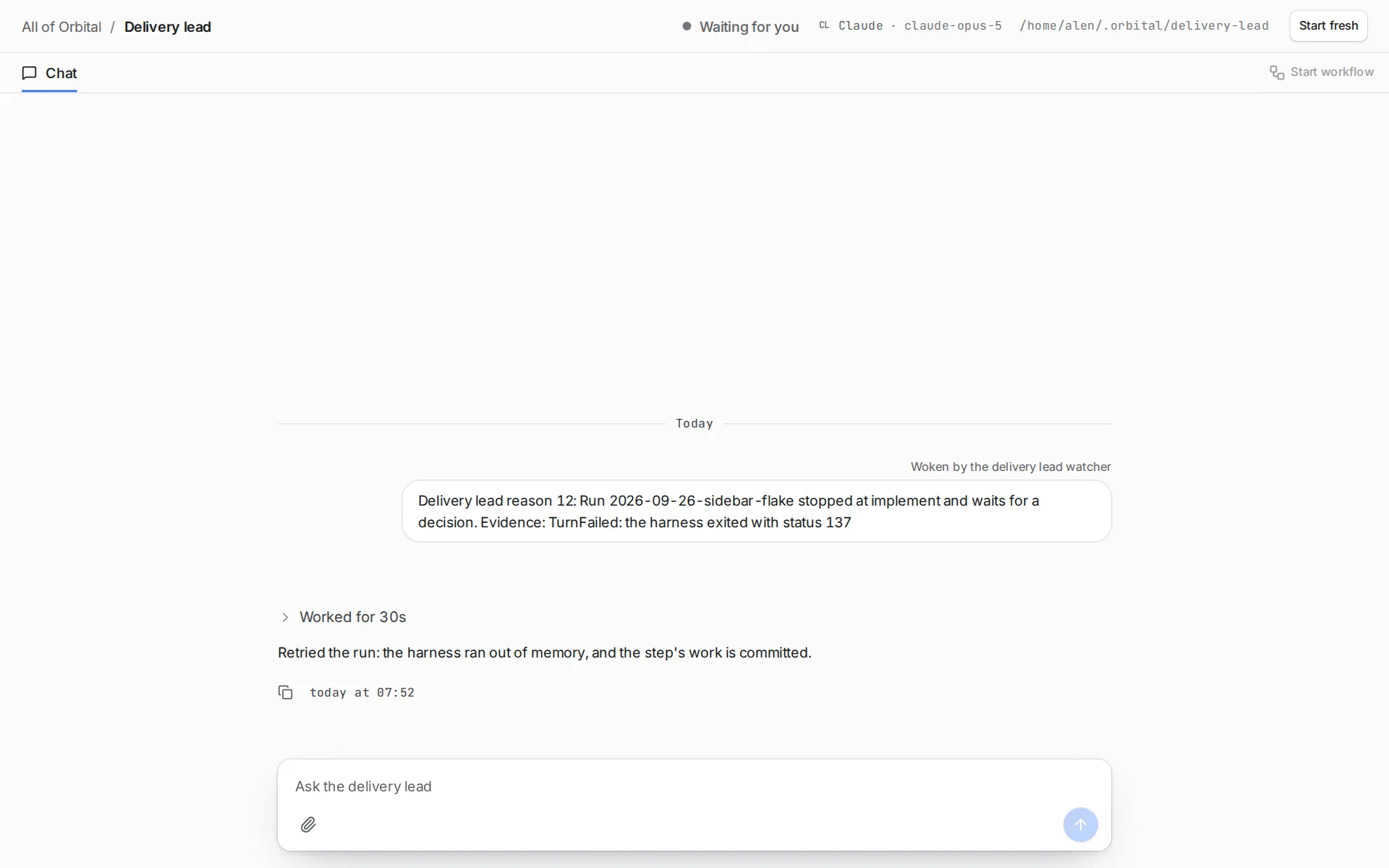
When an action is set to Ask me first, the delivery lead asks before it acts. A card appears in the chat, marked “Waiting for you”. It says what the delivery lead wants to do, where and why. Choose Approve to let it act once, or Decline to refuse. Either way, the delivery lead carries on with your answer. If desktop notifications are on, a notification opens the chat at that card.
Start it fresh
Section titled “Start it fresh”The delivery lead carries on one session from turn to turn, so an old conclusion can linger. Choose Start fresh in its chat header while it is waiting. The chat keeps its messages, and the next turn begins a new session. Its notes carry over.
The delivery lead tries Orbital’s tools before it says they are unavailable. If a turn cannot connect to Orbital, or Orbital refuses the connection, the chat shows it. Before the next turn, Orbital checks its own tools again, even after a restart, and tells the delivery lead whether they answered.
A delivery lead for one project
Section titled “A delivery lead for one project”A project can have a delivery lead of its own. Open the project’s page and choose Add delivery lead. Its pinned chat is named “Delivery lead · “ followed by the project’s name. It reads only that project.
Each run has one owner. If the run’s project has its own delivery lead, that delivery lead looks after the run. Otherwise the Orbital-wide delivery lead does. A project’s delivery lead can hand a matter, or a single run, to the Orbital-wide delivery lead. The run records the handover.
To stop, choose Remove delivery lead on the project’s page. Its runs go back to the Orbital-wide delivery lead. Its chat is archived, and its history stays readable.
You can still act on any run yourself.
Its settings
Section titled “Its settings”Open Settings > Delivery lead. Each change saves as you make it.
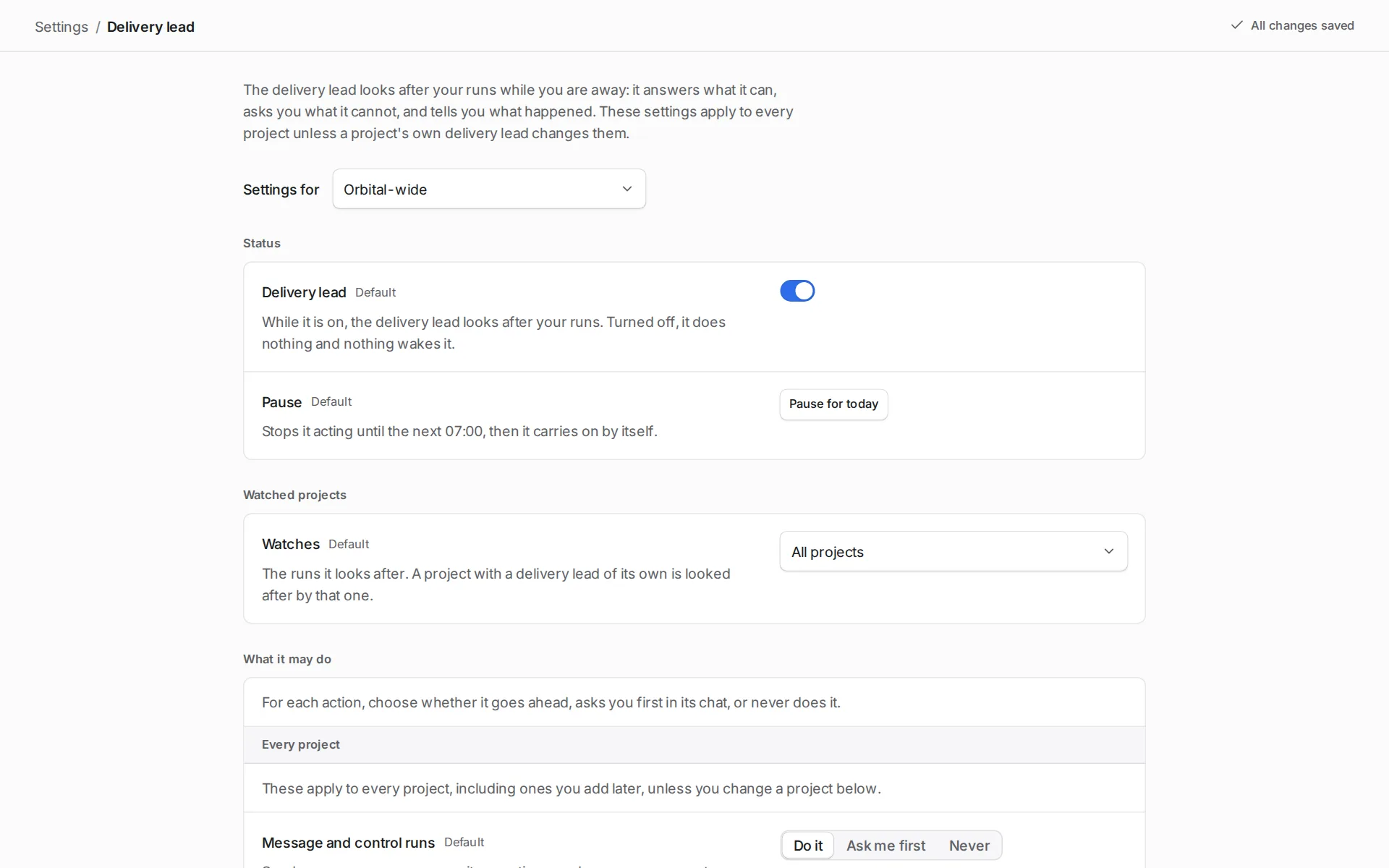
A picker at the top chooses which delivery lead you change: Orbital-wide, or a project’s own delivery lead. A project’s delivery lead follows the Orbital-wide settings until you change a field. Such a field shows “Same as Orbital-wide”. A changed field has a button to go back to the Orbital-wide value.
The page shows these groups, in this order:
| Group | What you can set |
|---|---|
| Status | The Delivery lead switch turns it on or off. Pause for today stops it acting until the next 07:00. |
| Watched projects | Watches: All projects, or “Only the projects I pick”. Only the Orbital-wide delivery lead has this group. |
| What it may do | For each action: Do it, Ask me first or Never. Every action starts at Do it. |
| What it may read | A switch for each connected source. |
| What wakes it | A switch for each of the three reasons, and Look over runs at work: Every hour, Every few hours or Off. |
| Who it is | Role: the role sets its prompt, and the preset in use sets its harness, model and effort. Edit both in Model settings, which the link under Role opens. The settings reference describes them under Personas and Styles. |
| Quota fallbacks | Move a run to: the presets to move a run to when its harness runs out of quota, tried first to last. See The fallback preset. |
| Spending | Daily limit: No limit, tokens a day, or an estimated cost a day in USD. It counts only the delivery lead’s own turns. Runs it started, at work at once: No cap, or at most a number you choose. |
| Notifications | Tell me about: Decisions only, Decisions and failures, or Every action. Quiet hours: during these hours you only hear about decisions it needs from you. Desktop notifications: On or Off. |
| Reports | When it acts, say: Brief says what it did, Detailed also says why. Daily summary: Off, or every day at a time you choose. |
| Notes | What the delivery lead keeps in mind between conversations, as it reads them at the start of each turn. It writes them itself, one dated observation at a time, and reflects on them once they grow long, folding what is finished into one summary. You can add, edit, pin, unpin and resolve an observation, each kept as a new one, read each reflection with the observations it folded under History, and clear everything, history included. |
| Your instructions | For all projects, and one field for each project. |
| Housekeeping | Archive finished runs: Never, or after a number of days. Keep its activity log: how many days to keep it. |
| Start over | Resets every field to its default. For a project’s delivery lead, it resets to the Orbital-wide settings. |
The actions under What it may do are these:
| Action |
|---|
| Message and control runs |
| Save and push a run’s work to its own branch |
| Switch a run’s harness |
| Start runs |
| Archive runs |
When the delivery lead reaches its daily limit, it stops acting for the rest of the day. It says so once in its chat.
The fallback preset
Section titled “The fallback preset”When a run’s harness runs out of quota, the delivery lead can move the run to the first preset in its Quota fallbacks list that can take it. It pins the run to that preset and retries the step with control_run ChangePreset. The retried step and every step after it run each role on the preset’s harness, model and effort. The run continues in place and keeps its work. A fallback whose preset no longer exists, or whose harness is not installed or not signed in, shows as unavailable, and the delivery lead skips it. Switch a run’s harness describes the move and where to set the list.
Choosing how to switch it off
Section titled “Choosing how to switch it off”Choose the lightest option that does what you need. The options run from lightest to heaviest.
| Option | How | What happens |
|---|---|---|
| Stop one kind of action | Under What it may do, set that action to Never. | It no longer takes that action. |
| Pause it for the day | Under Status, choose Pause for today. | It carries on by itself at 07:00, or when you choose Resume now. |
| Turn the delivery lead off | Under Status, turn off the Delivery lead switch. | It takes no actions and nothing wakes it. You can still talk to it in its chat. |
| Remove a project’s own delivery lead | On the project’s page, choose Remove delivery lead. | Its runs go back to the Orbital-wide delivery lead. |
| Turn off the feature | Open Settings > Experimental features and turn off Delivery lead. | No part of the delivery lead runs or shows. Orbital keeps its settings for when you turn it back on. |
Related
Section titled “Related”- Lead delivery: the loop a delivery lead follows, and how to run it.
- MCP tools: every rule Orbital applies to the delivery lead’s calls.
- Switch a run’s harness: how a quota fallback moves a run.
- Chats: how the delivery lead’s chat works like any other chat.
- Troubleshooting: fixes when the delivery lead does not act.