

Pass context between steps
Hand a value from one step to the next through the run's context
Hand a value from one step to a later one by declaring it as an output, then reading it from context. Context is the one store a run reads and writes as it moves through the workflow.
[steps.review]prompt = "Review the change."outputs.verdict = { kind = "choice", options = ["pass", "reject"] }outputs.findings = "text"routes = [{ if = "verdict == 'reject'", to = "steps.fix" }]next = "steps.done"
[steps.fix]prompt = "Address these findings: {{ context.findings }}"next = "steps.review"
Context starts with the goal and the declared inputs. It then gains an entry for every accepted agent output, every probe and command fact, what each action records, and each step’s outcome. Prompts read it, conditions read it, and nothing else carries information between steps.
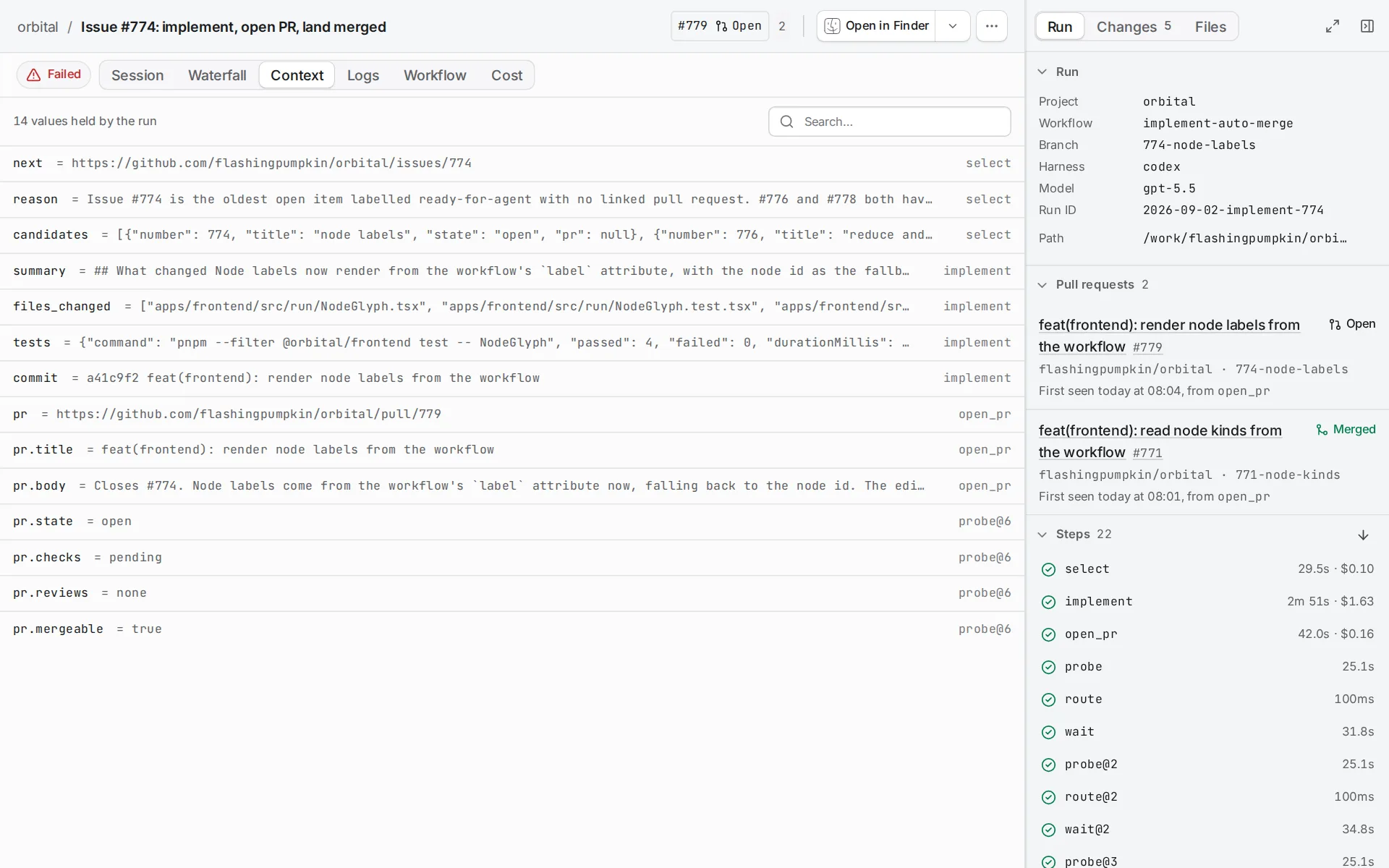
The run page’s Context tab lists every value the run holds and the step that set it.
What goes in
Section titled “What goes in”| Source | What it adds |
|---|---|
| Declared inputs | Copied into context when the run starts. |
| An agent step | Only the outputs it declares. |
| A probe step | Per-folder facts such as web.github.pr.raw, and rolled-up facts such as github.pr.state. |
| A command step | The facts it declares under facts. |
| An action step | What the action records, such as github.pr.url after github.pr.open, or git.worktree.clean after worktree.remove. |
| Every step | Its outcome, and failure_reason when it fails. |
Context in the reference lists the facts each probe writes.
Typed inputs
Section titled “Typed inputs”{{ inputs.work }} always renders the original input value. {{ context.work }} renders whatever the run holds now, which a later step can change. Workflows explains how to declare inputs.
An input’s kind decides what the run holds. A text or url input holds the text it was given. A ticket or epic input also holds the ticket Orbital read from GitHub or Linear when the run was created, so a prompt reads {{ inputs.ticket.title }} and {{ inputs.ticket.body }} without an agent fetching the ticket first. {{ inputs.ticket }} on its own renders the reference the run was given. Input kinds lists the fields.
Inputs reach more than prompts. Any value in the workflow file may read one, such as rounds = "{{ inputs.max_rounds }}" on a budget, and the validator checks that the input’s kind fits the key.
Declare outputs
Section titled “Declare outputs”An agent contributes only what it declares under outputs. It finishes its turn by calling the handoff tool with them, and the tool refuses undeclared keys. When an output is malformed, the agent gets up to two turns to correct it, and then the step fails. Context changes only once Orbital accepts the outputs. The final prose stays readable as {{ context.response.review }}, named after the step’s ID.
The short form gives only the kind, as outputs.findings = "text". An inline table adds more on one line, as verdict does above with its options. An output with more to say gets a table of its own:
[steps.review.outputs.findings]kind = "list"description = "Each problem that still stands"allow_empty = truerequired_if = "verdict == 'reject'"item.file = { kind = "short_text", description = "Path of the file" }item.severity = { kind = "choice", options = ["blocker", "nit"] }description tells the agent what the output is for. An output is required unless it sets required = false. required_if makes it required only when a condition over the same step’s outputs holds, so here the review owes findings only when it rejects; when the condition does not hold, the agent may still give them. The output a required_if reads may not be conditional itself, and a route may test only outputs that are always required.
A list output holds items, and each item.<name> declares one field of an item with its kind, description and options. Every item field is required, and an item field cannot be a list. allow_empty = true lets the list arrive with no items.
A ticket output names a ticket. The handoff refuses a value that is not written as a ticket reference, a URL, owner/repository#N, #N or a key such as ENG-123, and later templates read the reference as text, such as {{ context.ticket }}. Orbital does not look an output’s ticket up. Output kinds lists every kind.
What a step can read
Section titled “What a step can read”The validator checks, before a run starts, that a value is produced on every path that leads to the step reading it. This catches the common mistake: a prompt that reads a verdict only one branch produces. It fails validation rather than rendering empty at three in the morning.
When a value may be missing on purpose, say so with needs. Each need names a context path and the default the step uses when the value arrives empty or not at all:
[steps.summarise]prompt = "Summarise the work. The plan: {{ context.plan }} The implementer reported: {{ context.implementation_summary }}"needs.plan = ""needs.implementation_summary = "No summary was given.""" means no default, so that value must arrive on every path. A step without needs needs what its prompt reads. needs gives the full rules.
Two consequences follow:
- A parallel branch cannot read its sibling’s outputs. After the fan-in, read them through
parallel.results. See Run steps in parallel. - A repair prompt reached by a failure route can read
{{ context.failure_reason }}, because Orbital writes it whenever a step fails.
Clear context on purpose
Section titled “Clear context on purpose”A route with loop_restart = true clears the values the loop wrote to context, among other things. Use it when a loop starts a new piece of work, so the next pass does not reason about the last one. Add a loop lists what it clears and what it keeps.
Related
Section titled “Related”- Template variables: every name a prompt can read.
- Context: the exact fact names and output kinds.
- Add branches: how routes read context to choose the next step.
- How Orbital works: how context is saved and restored across a restart.