

Worktrees and delivery
Code workflows work in a worktree, open a pull request and see it merged
Give a workflow a worktree.create action when it must change files without touching your own checkout. A worktree is an isolated copy of a repository, on a branch of its own. This workflow makes one, changes it, and removes it only when nothing would be lost:
version = 3entry = "steps.checkout"
[steps.checkout]kind = "action"do = "worktree.create"next = "steps.implement"
[steps.implement]prompt = "Make the change the goal describes, commit it and push it."next = "steps.cleanup"
[steps.cleanup]kind = "action"do = "worktree.remove"routes = [{ if = "git.worktree.clean", to = "steps.done" }]next = "steps.kept"
[steps.done]kind = "terminal"
[steps.kept]kind = "terminal"outcome = "failed"label = "The worktree still holds work"
A worktree is optional. A run gets one only when its workflow has a worktree.create action. explain-repo, the research, follow-up and triage guides, and most workflows that only read and write text have none.
The shipped code workflows create a worktree first. When the work passes review, they open a pull request and repair it until it merges or closes. Then they remove the worktree, unless that would lose work.
Worktrees
Section titled “Worktrees”The worktree.create action makes one worktree for each repository folder of the project. All of them share one branch name, orbital/<id>. They live under ~/.orbital/worktrees/. Plain folders, which are not Git repositories, are used where they are. See plain folders and Git.
From then on, each agent step starts in the primary folder’s worktree and reaches the other worktrees as additional folders. Before a worktree exists, a step works in your own folders. That is why explain-repo, which makes no worktree, only reads. Its prompt tells it not to change files.
The dock’s Changes tab shows what the run changed in its worktree, and Files shows the worktree’s files. Open in opens the worktree in your editor.
Removing a worktree
Section titled “Removing a worktree”The worktree.remove action removes the run’s worktrees only when nothing in them would be lost. It keeps a worktree that holds uncommitted changes or commits nobody has pushed, and records why in git.worktree.status, with git.worktree.clean false. The shipped workflows then end on a terminal that says the worktree was kept, so you can look.
Set force = true on the step to remove the worktrees anyway. A forced removal discards uncommitted changes and untracked files; the run’s branch, with any unpushed commits, stays. A checkout the run borrowed from a chat is never removed.
Never delete a kept worktree to make a run look finished. Commit and push what you need first.
Archiving a run also removes its worktrees.
Delivery
Section titled “Delivery”The shipped delivery workflows share one delivery sub workflow, pr-delivery. It runs these stages:
| Stage | What happens |
|---|---|
| Publish | An agent step pushes the branch and opens the pull request, following the repository’s conventions. When the step ends, Orbital asks GitHub to squash-merge the pull request once its checks and reviews allow it. A pull request that can merge already merges at once. If the repository does not allow auto-merge, a rule blocks it, or the token lacks permission, the run’s history records that and delivery carries on. |
| Watch | A probe reads the pull request’s state from GitHub. |
| Wait at a gate | While the pull request waits for review or merge, the run waits at a human gate, “The pull request is waiting for review or merge”. It shows an eye and “Waiting: The pull request is waiting for review or merge”, and takes no run slot. Orbital looks at the pull request once a minute and carries on by itself when something changes. |
| Repair | Conflicts, failing CI and requested changes each have a repair step. A repair that changes the branch is reviewed against its reason alone, then published again. Before addressing new comments, a decision model judges whether they are a code review or only noise, such as a deploy bot’s preview status. Noise goes back to the wait and is not judged again; with no decision model, the run addresses every new comment. |
| End | A merged pull request ends the run Succeeded. A pull request closed without merging ends it Failed. |
A workflow of your own can also push the branch and open the pull request with actions rather than an agent step. Push and open pull requests without an agent shows how.
Choose Skip at the gate, or Resume, to make the run look at the pull request at once. Add gates and waits explains gates.

Turn auto-merge off
Section titled “Turn auto-merge off”No setting turns auto-merge off. It comes from auto_merge = "squash" on the publish step of pr-delivery. That is a sub workflow, not a workflow you can start or open by name. Each delivery workflow imports its own pr-delivery file from beside it. A separate pr-delivery of your own is never used. Instead, take your own copy of each delivery workflow you start, and delete auto_merge = "squash" from that copy’s pr-delivery.
Every shipped workflow except explain-repo delivers through pr-delivery. implement-ticket and implement-epic reach it through deliver-ticket.
To do it in the app:
-
Open the workflow.
Open Workflows and open the shipped workflow you use, for example
pursue-goal. -
Find the delivery file.
Open the Prompt docs tab and select the
pr-deliveryfile. It shows “Imported by delivery”, or “Imported by a nested workflow” forimplement-ticketandimplement-epic. -
Remove the key.
Delete
auto_merge = "squash"from thepublishstep, then save.
Saving stores your own copy, with its imported files, under the same name. The list shows it as Custom with “Hides Shipped”. Revert brings the shipped one back.
To do it with files, copy the workflow’s file, with the files it imports and its prompts/ folder, into ~/.orbital/workflows/ or the project’s .orbital/ folder. Keep every relative path. Delete auto_merge = "squash" from the copy’s pr-delivery file. A workflow there wins over a shipped workflow of the same name. The Ticket to merge example holds the same delivery files.
auto_merge describes the key.
When GitHub never runs a check
Section titled “When GitHub never runs a check”Sometimes GitHub does not run a required check at all, for example because of billing or no runner. The run is then Paused on the probe step, with GitHub’s reason and the check names. See standings. Fix the cause on GitHub, then choose Resume.
Several repositories
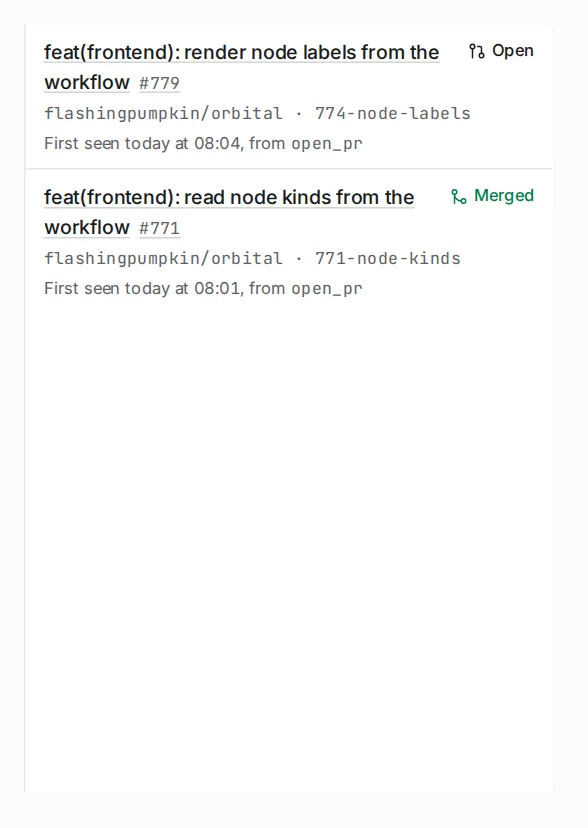
Section titled “Several repositories”A project with several repository folders gets one pull request per repository that changed. The run treats the set as one delivery. It merges only when every pull request merged, and it repairs the worst state first. The dock’s Pull requests section lists them all.
The GitHub token
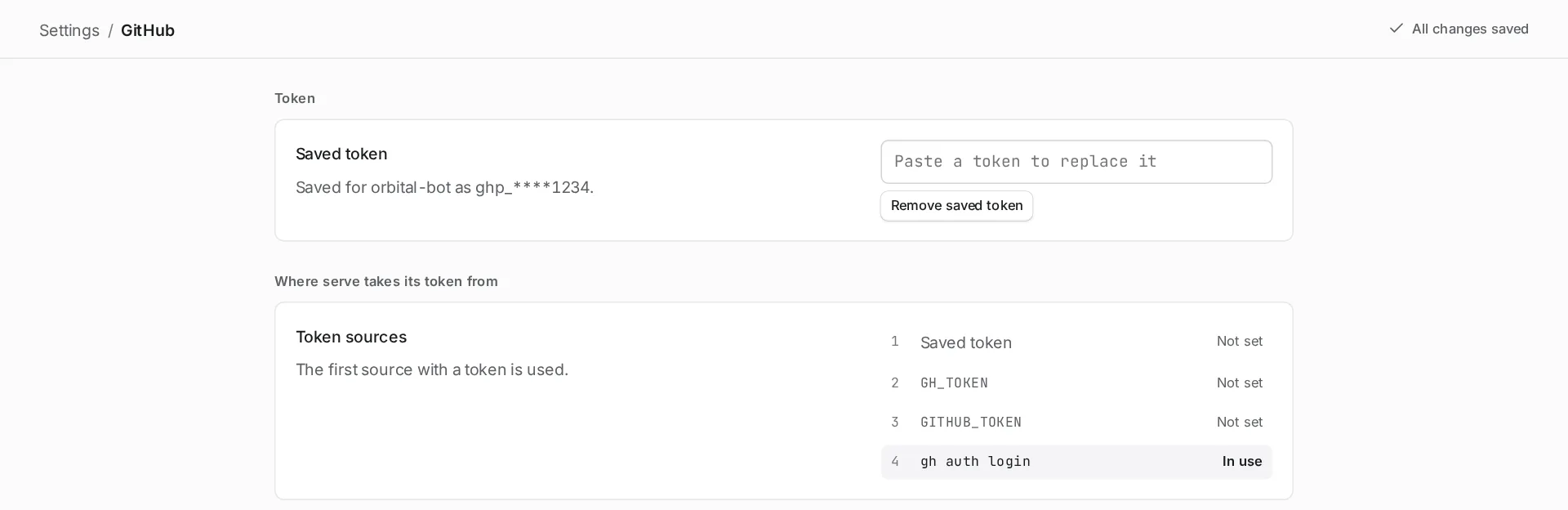
Section titled “The GitHub token”Delivery reads pull requests, checks and review threads through a GitHub token. Orbital tries these in order and uses the first it finds:
- the token saved in Settings > GitHub
GH_TOKENGITHUB_TOKEN- an existing
gh auth login
The page shows which one is in use. See Settings.
Related
Section titled “Related”- Add gates and waits: how the run waits for a pull request
- Implement a feature: a delivery workflow from goal to merge
- Ticket to merge: the delivery sub workflow file by file
- Troubleshooting: what to do when a worktree remains